
Database workbench
The Data sources overlay is a full database workbench: every connection you add for syncing can also be browsed, queried, edited, diagrammed, backed up and restored from the same place. Open it with the Data sources button at the top of the sidebar; close it with Done.
The overlay and its four tabs
The overlay splits in two. The left side lists your connections and, under each one, a schema tree of databases and tables. The right side has four tabs that act on whatever the tree has selected: Data (a row grid), Structure, Query and Diagram. The open state persists in the URL as ?data=1, so a reload brings the workbench back. Connections belong to the active workspace and are the same connections the bridge builder uses — the quickstart walks through creating one.
Five engines are supported: PostgreSQL (default port 5432), MySQL/MariaDB (3306), SQLite (a file path instead of a host), MongoDB (27017, with an optional connection URI for Atlas) and Redis (6379, plus a logical database index 0–15). The connection dialog has a Test button that tries the connection before saving, and credentials are encrypted at rest.
Browsing and editing rows
The Data tab reads through POST /api/connections/:id/browse: paginated, sortable, and filterable with any number of conditions. The page size is selectable — 25, 50, 100 (the default), 250 or 500 rows — and the server caps a single page at 1000. Filter operators are eq, neq, lt, lte, gt, gte, contains, startsWith, endsWith, isNull, notNull and in.
Editing goes through a row editor dialog: insert a new row, or update and delete existing ones. Rows are identified by primary key, so editing is only offered when the engine supports row editing and the table actually has a primary key. The export buttons write the rows currently in the grid to CSV or JSON entirely in the browser. There is no server round-trip, so what you export is exactly the page you are looking at.
The query editor
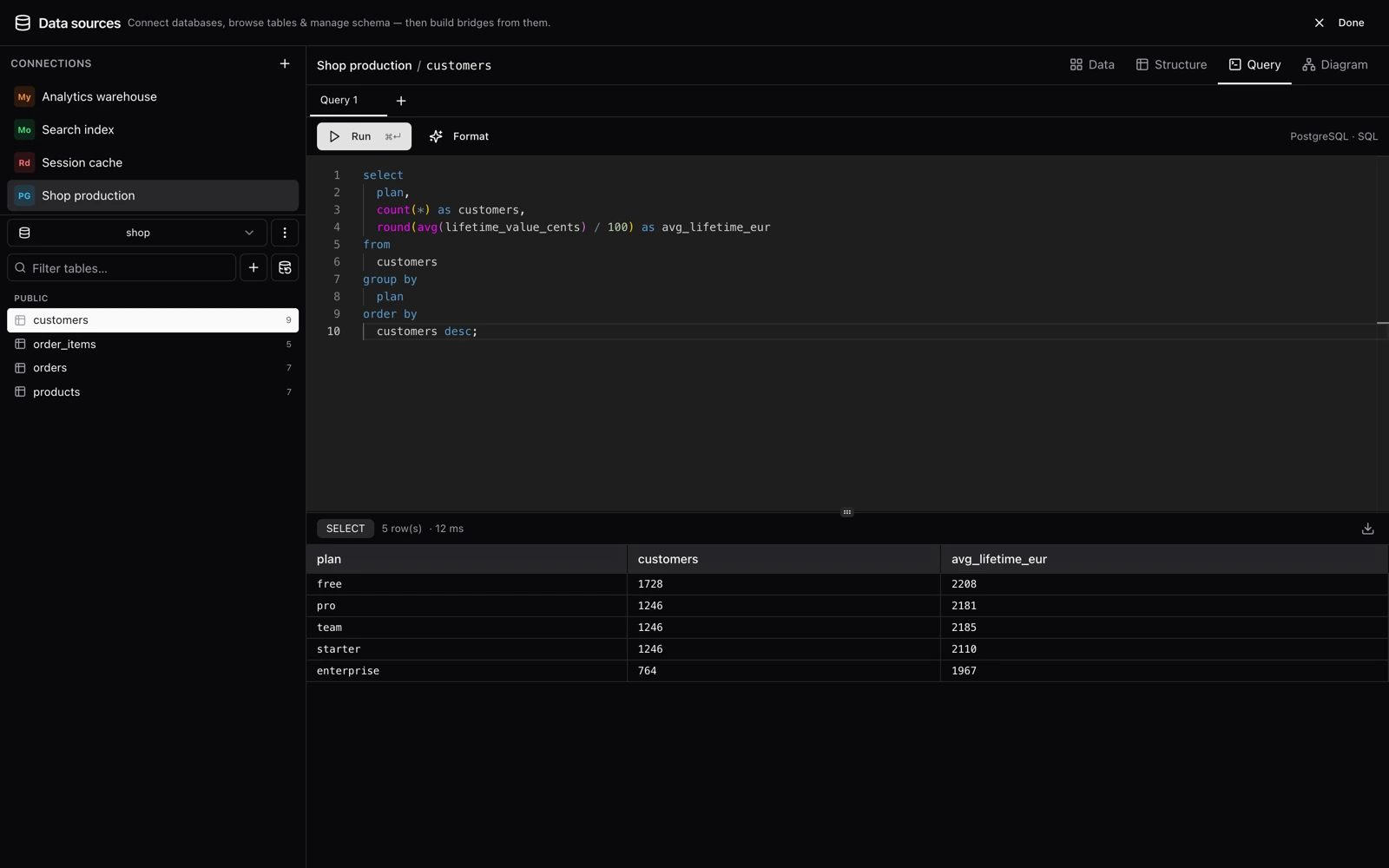
The Query tab is a multi-tab Monaco editor. Tabs keep their content when you switch views, autocomplete draws on the connection's schema, and Cmd/Ctrl+Enter runs the active tab. What you write depends on the engine:
- PostgreSQL, MySQL/MariaDB, SQLite — plain SQL, with a Format button (sql-formatter) in the toolbar.
- MongoDB — a JSON command document naming the collection. Supported operations:
find(withsortandlimit; the default limit is 100),aggregate(results capped at 1000 documents) andcountDocuments. - Redis — one command per line; lines starting with
#are comments.
MongoDB query — a JSON command document
{
  "collection": "users",
  "find": { "status": "active" },
  "sort": { "created_at": -1 },
  "limit": 20
}SQL results are capped at 5000 rows by default. The cap can be raised per connection with the maxQueryRows connection option — see Configuration for the related settings and their current limits.
Production, and read-only
Two things can be said about a connection in its dialog, and both are about not doing to one database what was meant for another.
Environment — production, staging or development — is a label, and it is shown wherever the connection is: a red PROD in the sidebar, next to the Run button of the query editor, in the list a bridge's targets are picked from. Nobody has the connection dialog open when they are about to run a DELETE.
The query editor reads a statement before it sends it. Anything that cannot be taken back — a DROP, a TRUNCATE, a DELETE or UPDATE with no WHERE, an ALTER … DROP, Redis's FLUSHALL / FLUSHDB, a MongoDB pipeline ending in $out — is confirmed first, on any connection. On a connection labelled production, so is any write. The reading ignores what is inside strings, quoted names and comments, so SELECT 'DROP TABLE users' is a read, and a DROP behind a comment is still found.
Read-only goes further: nothing is written through the connection. Not a row from the data grid, not a table, not a restore — those routes answer 403 and name the connection — and not a statement in the editor unless every part of it is recognisably a read. That rule is an allowlist: what Syncle cannot tell to be a read (CALL, DO, SET, anything it does not know) is not run. And because the text of a statement cannot know what a function called from a SELECT does, the engine is asked to hold it to reading as well: PostgreSQL and MySQL run it inside a READ ONLY transaction, SQLite is asked whether the prepared statement writes.
- A read-only connection cannot be a bridge's destination: refused when the bridge is saved, and a connection that becomes read-only under a running bridge fails its next delivery with a message that says why, writing nothing. The guard sits where every write passes — the adapter itself — so it holds for a replay, a live bridge and a dead-letter retry alike.
- It can be a bridge's source, which is what read-only is mostly for: mark production read-only and stream out of it. A change-stream bridge still creates what the engine needs to stream from — on PostgreSQL a publication and a replication slot. They hold no data and change none.
Structure and the ER diagram
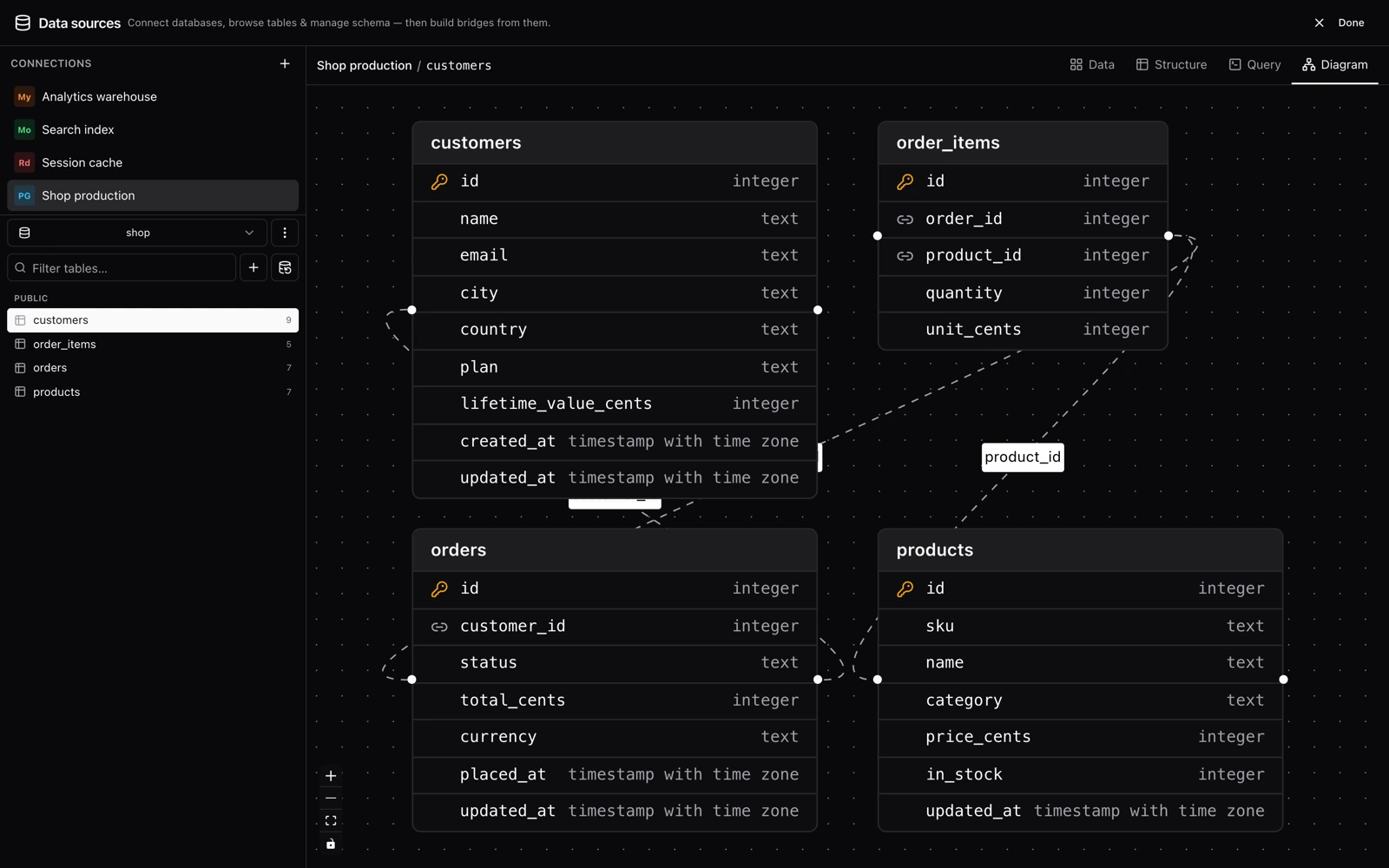
Structure shows the selected table's columns with primary-key and foreign-key badges. Diagram renders the whole schema as an interactive ER diagram: one node per table listing up to its first 20 columns — a key icon marks the primary key, a link icon marks referencing columns — and an edge for every foreign key, labeled with the referencing columns. Only engines that report foreign keys (the three relational ones) get edges; MongoDB and Redis schemas render as unconnected nodes.
Schema operations
The schema tree doubles as the DDL surface. At the connection level you can create and drop databases on PostgreSQL and MySQL/MariaDB — SQLite is a single file, MongoDB creates a database implicitly when you add a collection to it, and Redis databases are fixed numbered slots. Tables (and MongoDB collections, which behave like tables here) are created through a dialog whose column types come from the driver; names must match ^[A-Za-z_][A-Za-z0-9_$]*$ and stay within 128 characters.
Per table, the tree offers: browse it, open it in the query editor (SQL engines), seed the bridge builder from it (see How bridges work), truncate it, or drop it. Destructive actions ask for confirmation first. Redis has no tables or databases to manage, so none of this appears for it.
Backup and restore
| Format | Contents | Engines |
|---|---|---|
json | Portable dump of schema and data in Syncle's own format (version 1); any engine can restore it, via parameterized inserts | all five |
sql | A DDL + INSERT script | PostgreSQL, MySQL/MariaDB, SQLite |
On the relational engines, backups fetch 1000 rows per batch to bound memory and restores insert up to 500 rows at a time; MongoDB and Redis stream in their own units. The browser calls POST /api/connections/:id/backup?database=..., which returns { filename, format, content } — the filename is <database>-<timestamp>.json or .sql — and saves the file locally (see the HTTP API page for the response envelope). Individual tables can also be backed up to JSON from their own menu. Restore takes an uploaded .json or .sql file; the format is inferred from the extension.
What each engine supports
Feature availability never branches on engine names. Each driver publishes capability flags through GET /api/drivers — query language, DDL, database management, row editing, backup formats — and the UI shows or hides features by reading those flags. An engine that lacks a capability just does not offer the control.
| Engine | Query language | DDL | Manage databases | Foreign keys | Transactions | Backup formats |
|---|---|---|---|---|---|---|
| PostgreSQL | SQL | yes | yes | yes | yes | json, sql |
| MySQL/MariaDB | SQL | yes | yes | yes | yes | json, sql |
| SQLite | SQL | yes | — | yes | yes | json, sql |
| MongoDB | JSON command documents | yes (collections) | — | — | — | json |
| Redis | Redis commands | — | — | — | — | json |
Connection strings
PostgreSQL, MySQL/MariaDB, MongoDB and Redis connections can be given as a single connection string instead of separate host, port, user and password fields — which is what a hosted database (Neon, Supabase, PlanetScale, Atlas, Upstash…) usually hands you:
postgres://user:password@host:5432/database?sslmode=require
mysql://user:password@host:3306/database
mongodb+srv://user:password@cluster.example.net/database
rediss://default:password@host:6379/0When the field is filled in it is used instead of the fields above it. The string contains a password, so it is treated as one: encrypted at rest, and shown back as ******** — leave that in place when you edit the connection and the stored string is kept. The database a string names is only a default: browsing another database in the workbench, or a bridge whose source says which database it reads, uses that database with the same credentials. A string's own sslmode or rediss:// scheme turns TLS on; the TLS setting beside it decides how far the certificate is trusted. A connection string cannot be combined with an SSH tunnel.
TLS to the database
A connection's TLS setting applies to every connection Syncle opens with it — the workbench, replay jobs, and the CDC change streams, which are separate connections of their own. The four modes are PostgreSQL's sslmode values, because those are the names people already know, and they mean the same thing on every engine:
| Mode | Encrypted | Checks the CA | Checks the host name | Protects against |
|---|---|---|---|---|
| Off | no | — | — | nothing; the password crosses the network in plain text |
Encrypt only (require) | yes | no | no | passive eavesdropping only — whoever can sit in the path can present any certificate and be accepted |
Verify the authority (verify-ca) | yes | yes | no | an impostor without a certificate from your CA — but any server holding one passes |
Verify authority and host (verify-full) | yes | yes | yes | impersonation: the only mode that proves you reached the server you meant to. Use this one |
Give a CA certificate (PEM) when the database uses a private CA — a self-hosted server, or a cloud provider's own root. Leave it empty to trust the system's authorities, which is right for a managed database with a public certificate. The expected server name is for the case where the certificate was issued to a different name than the one you dial — an IP address in the host field, say. A client certificate and key are for servers that demand mutual TLS; the key is encrypted at rest and comes back redacted, like a password.
Through an SSH tunnel the certificate is still checked against the database's host name, not the tunnel's 127.0.0.1 — so verify-full works through a bastion without listing loopback addresses on your certificates.
SSH tunnels
A database on a private network can be reached through an SSH tunnel configured on the connection itself: SSH host, port (default 22) and user, authenticated by password or a PEM private key with an optional passphrase. The tunnel is opened by the API server, and the SSH secrets are encrypted at rest alongside the database password — see Self-hosting & security for the wider posture.
The jump host's identity is checked the way ssh itself checks it. Paste its host key fingerprint (SHA256:…, as ssh-keygen -lf prints it) and any other key is refused. Leave it empty and the key seen on the first successful connection is recorded and enforced from then on — the Test button shows you that fingerprint so you can compare it first. If a host later presents a different key, the tunnel refuses to open and says so: either the server was reinstalled or something is answering in its place. Confirm the new fingerprint with whoever runs the host before updating it.
Two rules are enforced at validation time. SQLite connections cannot use a tunnel — a file has no network hop — and the API refuses with "SSH tunnels are not supported for SQLite connections". A tunnel also cannot be combined with a connection string, because the tunnel rewrites the discrete host and port and a full URI would bypass it; use the separate host/port fields instead. That leaves PostgreSQL, MySQL/MariaDB, MongoDB and Redis as the engines that tunnel.
A tunnel covers everything the connection is used for: the workbench, replays and watch bridges, and CDC change streams, which open a tunnel of their own that lives exactly as long as the stream and is re-established if the SSH connection drops. (Until recently a change stream dialled the database host directly and ignored the tunnel, so CDC could not be used with a tunnelled connection at all.) Through a tunnel a MongoDB connection talks only to the address it was given rather than discovering the replica set's other members, whose internal names cannot be reached from this side of the bastion — point it at the primary.